Bin Locking Discipline And Project Splitting In Premiere Pro Productions
Bin locking discipline and project splitting in Premiere Pro: lock rules, Productions vs Team Projects, and handoff benchmarks for brand teams.

Discovering that two editors have been cutting separate versions of the delivery sequence rarely helps when the client screening lands on a Friday. During the edit bin-lock collisions tend to stay hidden, then surface once the incorrect cut hits the review link and the entire delivery day is lost to rebuilding. The production split, ownership conventions and handoff logs we use aim to surface those conflicts early enough for a fix.
What are the verified benchmarks for bin locking discipline and project splitting in Premiere Pro productions? #
Direct published figures on bin locking remain sparse; handoff times, review rounds and staffing capacity offer the more practical operational yardsticks. When proxies move through cloud-streaming storage with frame-accurate markers, teams report handoff waits up to 78% shorter than workflows relying on shipped drives or camera-original ZIP archives [LucidLink & Frame.io Remote Post Case Studies, 2025]. With structured, timecode-pinned review links, stakeholder revisions settle at a median of 2.4 rounds, compared with 4+ rounds via unthreaded email [Frame.io Workflow Study, 2025].
That discipline around handoffs must still hold under versioning pressure. Enterprise brand campaigns regularly produce 3 aspect ratios from every hero sequence [Wistia State of Video Report, 2025]: a 16:9 master, a 9:16 vertical, and a 1:1 or 4:5 feed. Every additional sequence requires a clear owner and a traceable link to the approved master.
Boutique agency benchmarks place healthy billable editor utilisation at 65% to 75% [Promethean Agency Operations Benchmark, 2025], which leaves 25% to 35% for ingest, render queues, QC and template maintenance. That remaining time should be blocked in the schedule well before the campaign hits finishing.
| Benchmark | Reported figure | Source | How we use it |
|---|---|---|---|
| Handoff wait versus shipped drives | Up to 78% shorter | [LucidLink & Frame.io Remote Post Case Studies, 2025] | Justifies proxy handoff over archive copies |
| Stakeholder revision rounds | 2.4 rounds median | [Frame.io Workflow Study, 2025] | Sets the round cap on timecode-pinned review |
| Deliverables per hero sequence | 3 aspect ratios | [Wistia State of Video Report, 2025] | One locked sequence per ratio |
| Billable editor utilization | 65% to 75% | [Promethean Agency Operations Benchmark, 2025] | Keeps 25% to 35% free for ingest and QC |
Treat these figures as early warnings for schedule pressure, then test them against the campaign’s real approval chain and storage setup. The utilisation band warrants close attention. When editors sit near the top of that range, check-ins and handoff housekeeping tend to get squeezed between the final client note and the next booking.
Step-by-step Premiere Pro and DaVinci Resolve setup for bin locking discipline and project splitting in Premiere Pro productions #
Splitting the production with a .prodset file #
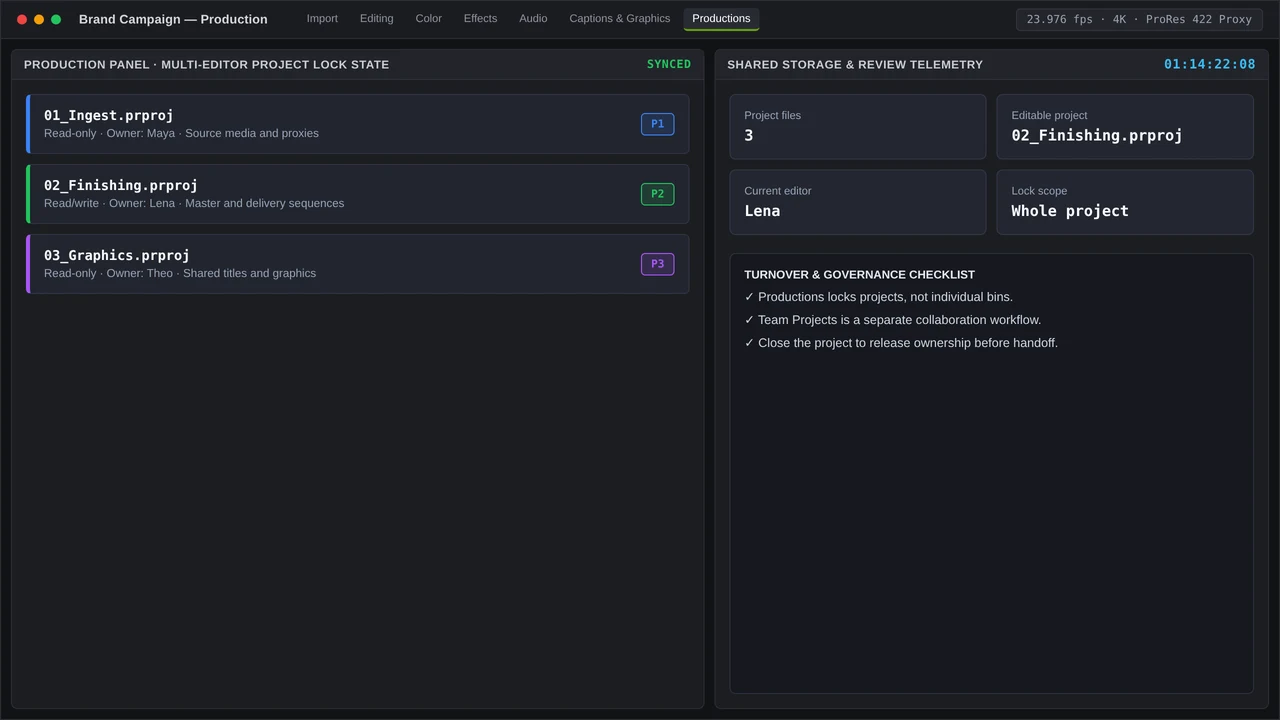
In a Premiere Pro Production, related .prproj files live beneath a single .prodset and open together inside the Production panel. Assign ingest, finishing and graphics to separate projects, so each department can keep working without locking the entire campaign.
Allocate ownership according to function. Camera originals and proxies live in the ingest project; the finishing project carries the hero sequences; brand templates sit in graphics. Deliverable versions retain a traceable source, while graphics updates can continue alongside master preparation in the cutting room. Number the stage folders to keep the tree readable once multiple projects are open:
01_INGEST_originals
02_PROXY_sync
03_FINISH_masters
04_DELIVERY_ratios
05_GRAPHICS_brand
Locking bins with Team Projects check-out #
In Team Projects, check-out creates ownership at the item level: the editor inside a bin or sequence claims it, colleagues receive read-only access, and check-in frees the lock. Build that release into the end-of-session routine, next to saving and confirming media status. A stale checkout left on the delivery bin can force the next editor to export whatever version happens to remain accessible.
While work is live, include the owner’s initials in the bin name and hold the delivery bin under one person’s checkout. Anyone opening the project should see who owns what without trawling the production chat.
Store brand MOGRTs in a Graphics bin that belongs to the template maintainer alone. Editors pull them via the Graphics Templates panel and tweak exposed controls in Properties, leaving the source template intact. Route captions through the Text panel, keeping styling identical across every ratio.
Handing off to DaVinci Resolve #
Once the finishing sequence locks, shift colour and Fairlight audio to a dedicated project. Export XML or AAF, conform within Resolve Studio, and keep the Premiere sequence read-only for the duration of the colour pass. Include the exported version in the Resolve project name at handoff; rebuilding that link from file dates turns awkward the moment a replacement shot lands.
Resolve Studio is listed at $295 for a perpetual licence, so budget the necessary seats during finishing before handoff occurs.
Frame.io (v4) looks after review comments and asset transfers, syncing timecode comments to Premiere markers. Keep that review function separate from live shared editing; LucidLink typically pairs alongside it for block-level shared media.
Excalibur, a one-time $100 extension for Premiere, covers instant nesting and anchor centring. With it the team can assemble the nested master via a macro and apply the same operation reliably across versions. Transcript analysis remains the job of dedicated rough-cut tools.
Common timeline bottlenecks and QC checks when handling bin locking discipline and project splitting in Premiere Pro productions #
Bottlenecks that recur on brand teams #
These jobs rarely lose their day to playback. Where codec and hardware align, hardware decode for H.264 and HEVC 4:2:2 10-bit on Apple Silicon, Intel Quick Sync and NVIDIA NVDEC allows even modest machines to cut without strain. When schedules begin to slip, proxy synchronisation and render queues merit closer attention.
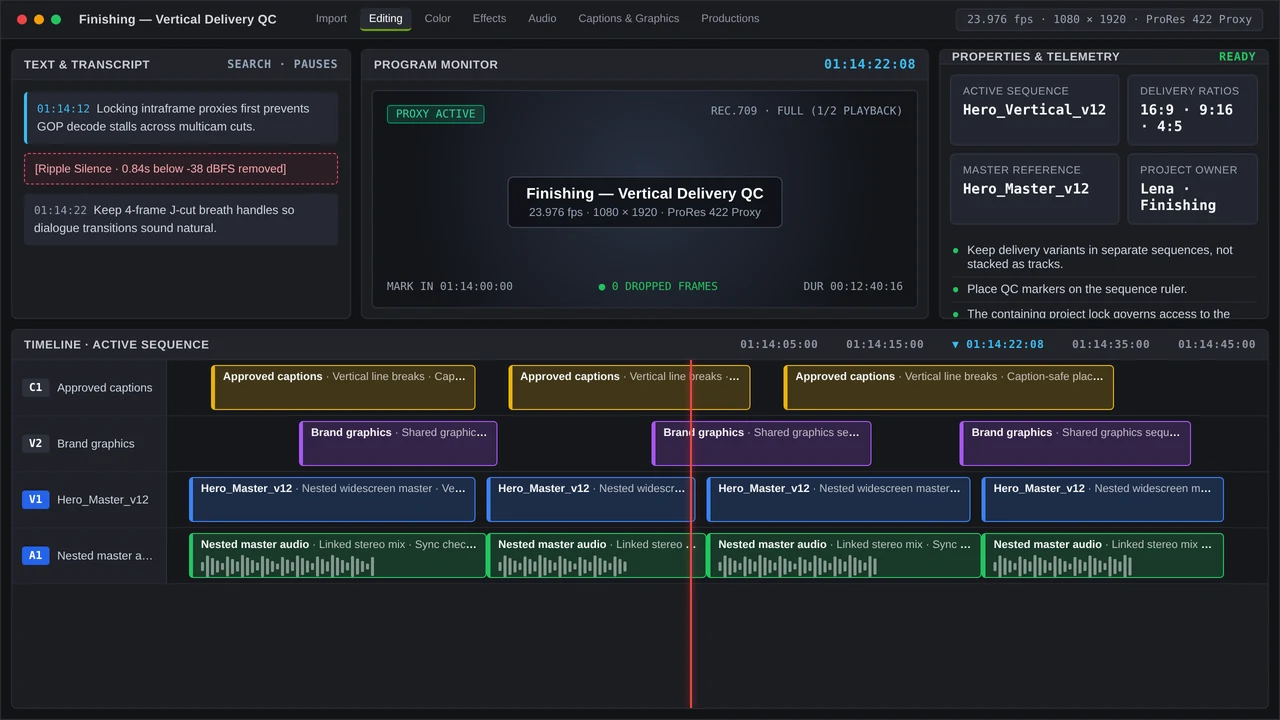
A familiar version collision appears when one editor builds the 9:16 delivery from a 16:9 master still checked out elsewhere. Both sequences keep shifting, and the mismatch persists until durations get compared or the wrong export reaches a screening.
Storage failures trigger a different dispute: a bin looks locked, the underlying media has gone offline on shared storage, and the lock takes the blame. Confirm media availability before requesting that colleagues release ownership.
Captions add a further dependency. Native speech-to-text generates baseline subtitles, whereas animated word-by-word presets depend on MOGRTs. After a duplicated template gathers local tweaks, ratios can diverge even though the text remains identical.
QC checks before sign-off #
Before any ratio leaves, validate the delivery project against the approved master:
- All delivery sequences have been checked in and temporary owner initials removed.
- Every aspect sequence nests an identical master version. Look into mismatched durations and stale nests ahead of export.
- Frame.io comments stand resolved against the current review version.
- The finishing project shows no offline media.
- Brand parameters received adjustments in the Properties panel, without local edits to the source template.
- Caption tracks sit inside the template safe zones across all ratios.
Track handoff rounds on every campaign. Consistently running beyond the 2.4 round median often signals trouble in the review structure and the brief: verify who retains approval reopen rights, which stakeholders hold the current link, and whether regional teams continue commenting on an earlier version. File the current review link alongside the approved export filename in the delivery log.
More in Shared Sequence
Quick Desk Guide: Consolidating Client Timecode Notes Across Regional Brand Stakeholders
Consolidate regional client timecode notes into one pinned review log. Structured links cut revision loops to a median 2.4 rounds versus 4+ by email.